


Data Objects
Learn about usage of Data Object in Toncut, using examples and clearly readable tables.
Profile
Profile refers to an optimization profile.
It describes the configuration for algorithms to be used and optimization limits, such as maximum time, maximum number of combination, etc.
An optimization profile allows users to specify the parameters and constraints for an optimization process, ensuring that the algorithms used are tailored to their specific needs and requirements.
The user can define up to 20 profiles, allowing them to test different optimization strategies to achieve the best results.
| Attributes |
|---|
namestring mandatoryThe name of the optimization profile.
activebool mandatorySet it to
true, to activate the profile. It will be used only if it is active.algorithmsobject mandatoryConfiguration of algorithms to be used by the profile.
Show Child Attributes
Each algorithm is ignored if
aialgorithm is enabled.limitsobjectHere we can define the conditions for early termination of global and/or single optimization.
A configuration profile is validated when it is loaded; an invalid value is a load error, not a silent default. Counts and time limits must not be negative, and a limit that is
enabledmust be greater than zero. A time limit must be a finite number of time units within the supported range. Percentages (goodEnoughWaste,minWaste,threshold) must be between0and100, andalgorithms.ai.levelbetween0and4. A sub-section that is present but is not a JSON object is rejected as well.Show Child Attributes
stockOrderobjectHere we can specify the stock sequence strategy. This is of great importance and can significantly affect the quality of the results.
These settings apply to all algorithms except
ai.Regardless of the configured sort order, a stock item that is the only remaining stock able to hold a piece the job still needs is tried early. A layout that places such a piece is accepted even when it is otherwise sparse.
Stock holes hold no material, so stock usage, sparseness, and the large-stock decisions of the stock search are measured on the stock's material area, not on its gross size.
Show Child Attributes
advancedobjectHere we can change some advanced settings.
Before you change anything here, make sure you understand what you are doing, as these settings may significantly change the quality of results and also time of the optimization process.
Show Child Attributes
Profile object
Device
Device object represents a cutting device.
It specifies the features and limitations of the device.
| Attributes |
|---|
idint mandatoryUnique device id.
titlestring mandatoryDevice title.
driverstringIdentifier of the device driver associated with this device.
defaultRotationangle def: 0°Default (initial) rotation of the device's work area, as used by TonCut Desktop. Like the piece
rotation, it honoursdefaultUnits.angle(the format default angle unit is radians), and a string such as"90deg"forces the unit. Allowed values are 0°, 90°, 180° and 270°; any other value is rejected with the errorDevice default rotation must be 0, 90, 180 or 270 degrees.It does not affect optimization or the results.defaultMirrorbool def: falseDefault (initial) mirroring of the device's work area, as used by TonCut Desktop.
truemirrors the work area horizontally (left-right); a mirror is always left-right. Combined withdefaultRotationit expresses every orientation (a top-bottom flip is a left-right mirror plus 180°). A non-boolean value is rejected with the errordefaultMirror: expected a boolean.It does not affect optimization or the results.materialKindmandatoryMaterialKindenum Material kind device's made for
Allowed values
1d1D materials like profiles, pipes, rods, beams, etc.
2d2D materials like glass, panels, fabric, aluminum, cardboard, etc.
Specifies the material kind this device is made for.
slantsobject 1D onlySpecifies support for miter cuts in 1D materials.
Show Child Attributes
canCutAnyShapesbool 2D onlydef: falseSet it to
trueif the device allows cutting of non-rectangular shapes (e.g. circles, polygons, etc.).Available only with Ultimate license!It forces special true-nesting algorithm that may be slower than the standard one.canCrossCutsbool 2D onlydef: falseSet it to
trueif the device allows the cuts to cross each other.Ignored ifcanCutAnyShapesis enabled.fullCutsOnlybool 2D onlydef: trueSet it to
trueif only full cuts (from edge to edge) are allowed.Ignored ifcanCutAnyShapesis enabled.stripCutting2D onlydef: noneStripCuttingenum Strip cutting direction
Allowed values
noneNo strip cutting.
byLengthHorizontal strips.
byWidthVertical strips.
Set it to
byLengthorbyWidthif the device cuts in strips (e.g. for panel saw).It makes sense only if
fullCutsOnlyoption is set totrue.
It may be used together withmaxCutDepthoption.Ignored ifcanCutAnyShapesis enabled.For backward compatibility, when
stripCuttingis absent a booleanstripCutsis accepted:truemeansbyLengthandfalsemeansnone. New integrations should usestripCutting.maxStripeWidthlengthdef: 1200mmUsed only when strip cutting is enabled (see
stripCuttingabove); specifies the maximum stripe width.minCutDistancelengthdef: 0The minimum kerf-excluded material gap between span-overlapping parallel interior cuts (line spacing minus kerf). It applies between parallel cuts only. It does not apply between a cut and the stock boundary or a hole edge. Use
0to disable this limit.Setting this value makes sense when cutting glass – you don't want to have two parallel cuts too close to each other, because then breaking off can be significantly more difficult.
Please note that this is not a kerf that can be set in the material group settings.
minCutDistanceis distinct fromminCutSize: it constrains the kerf-excluded material gap between span-overlapping parallel cuts, whileminCutSizeconstrains cut-out dimensions. The legacyminCutWidthname does not configure this setting.minCutSizelengthdef: 0The minimum permitted dimension of a rectangular cut-out. The limit applies to both its length and width, including pieces, trims, waste, and reusable waste. For one-dimensional cutting, only length is checked. A dimension equal to the limit is allowed. Use
0to disable this limit. Pieces below the limit are loaded normally. Methods that enforce an individual-piece minimum exclude them during selection before optimization, leaving them unplaced. The comparison uses effective cutting dimensions, including additions and edging adjustments. A method that supports smaller constituent pieces through series or sets keeps those pieces eligible. This exception applies only to individual pieces; edging, waste, reusable waste, and remnants retain their minimum-size requirements.The former name
minCutWidthis accepted for backward compatibility. New integrations should useminCutSize. If both names are present,minCutSizetakes precedence.minEdgeDistanceobjectDefines the minimum distance from each stock edge to a parallel cut. This is a cut-position limit, not a reserved stock band. The limit applies at the edge of a stock hole as at a sheet edge, with the margin of the sheet side that the hole edge stands in for (a hole edge with material below it acts as a top edge, one with material to its right as a left edge). Values can be overridden per side by the Material and StockItem settings.
Show Child Attributes
edgingCuts2D onlydef: optimalEdgingCutsenum Specifies the edging method
Allowed values
optimalAn optimal edging method ensures precise and accurate cutting of edges, resulting in clean, smooth, and well-defined boundaries while minimizing any unintended removal or distortion of the desired elements.
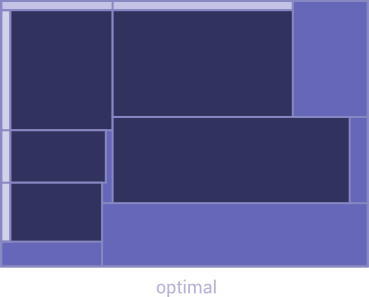
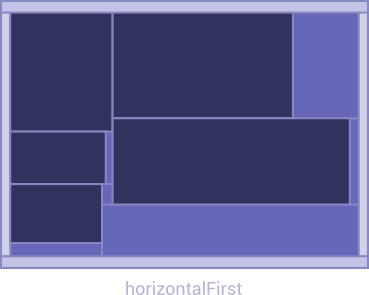
horizontalFirstA "HorizontalFirst" edging method involves cutting off the horizontal edges first, followed by the vertical edges.
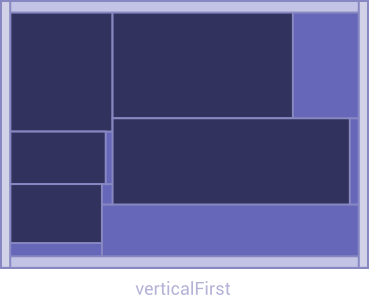
verticalFirstA "VerticalFirst" edging method refers to a technique where the vertical edges are cut off before the horizontal edges.
Edging method.
originEdgingCuts2D onlydef: defaultOriginEdgingCutsenum Edging method for the top and left edges.
Allowed values
defaultNothing changes and edges will be cut off as described in
edgingCutsproperty description.twoFullCutsTop and left edges will be cut off as full cuts (from edge to edge)
Edging method for the top and left edges.
firstCutDirectionSpecifies whether the first cut will be done horizontally or vertically. Note that it is overwritten if strip cutting is turned on.
It's important to note that setting the correct
firstCutDirectioncan be crucial when used in conjunction with themaxCutDepthoption.Ignored ifcanCutAnyShapesis enabled.maxCutDepthobject 2D onlySpecifies maximum cut depth level the device is supporting.
The picture below shows what is the cut depth level: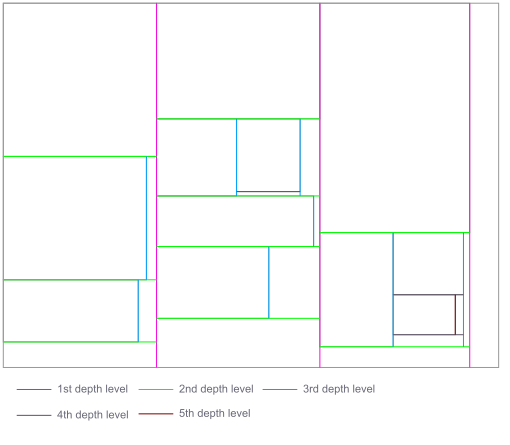 Ignored if
canCutAnyShapesis enabled.It makes sense only if
fullCutsOnlyis set totrue.Show Child Attributes
maxCutLengthByLengthobjectMaximum horizontal cut length.
It can also be used when cutting in strips - then it allows to limit the width of the strip.This option is especially useful when the device is a guillotine.
Ignored ifcanCutAnyShapesis enabled.Show Child Attributes
maxCutLengthByWidthobject 2D onlyMaximum vertical cut length.
It can also be used when cutting in strips - then it allows to limit the width of the strip.This option is especially useful when the device is a guillotine.
Ignored ifcanCutAnyShapesis enabled.Show Child Attributes
costsobjectDefines cost parameters for cost-based optimization. See cmdAddJob's
bestSolutionCriterioninput parameter for more details.Available only with Enterprise license!Accurate cost values are essential for generating meaningful optimization results. Cost parameters may be defined on multiple levels -
Device,Material,Piece, andStockItem. If these values are incomplete, inconsistent, or significantly inaccurate, the optimization engine will inevitably reflect these issues in its output. To ensure reliable and realistic results, verify that all relevant cost fields are correctly provided and aligned with actual production and operational conditions.Show Child Attributes
algorithmDataobjectOptional opaque algorithm-specific data for this device. Its contents are implementation-defined and are not part of the public API contract.
Supply
algorithmDataonly through an integration-specific contract.Available only with Enterprise license! Without it the property is ignored.customDataanyCustom data that will be directly passed to
customData.deviceproperty in Cutting.It can be any JSON compatible data, for example:
{ "myId": "932422" },"932422", or932422.Available only with Enterprise license!


StandardStockItem
The StandardStockItem object is used to define standard dimensions and default characteristics of stock items.
For each material you can define list of standard stock items.
| Attributes |
|---|
idint mandatoryUnique id of a StandardStockItem.
titlestringTitle of a StandardStockItem.
lengthlength mandatoryLength of a StandardStockItem.
widthlength mandatory 2D onlyWidth of a StandardStockItem.
structure2D onlydef: []Structuresset The structure of the StandardStockItem
Allowed values
noneThe material has no structure.
byLengthThe structure is horizontal (along length).
byWidthThe structure is vertical (along width).
The structure of the StandardStockItem.
edgingobjectEdging configuration.
Show Child Attributes
Material
The Material object defines material group.
Each piece or StockItem must belong to a material group.
Thanks to this, the program knows which pieces are to be placed on which stock items.
| Attributes |
|---|
idint mandatoryUnique id of a material group.
deviceIdint mandatoryId of a cutting device used to cut this material group.
algorithmstringAllows selection of custom algorithms.
Available only with Enterprise license!titlestring mandatoryTitle of the material group.
kindmandatoryMaterialKindenum Type of the material
Allowed values
1d1D materials like profiles, pipes, rods, beams, etc.
2d2D materials like glass, panels, fabric, aluminum, cardboard, etc.
Specifies the type of the material.
widthlength mandatory 1D onlySpecifies the width of the material.
thicknesslength mandatorySpecifies the thickness of the material.
canHaveStructurebool 2D onlydef: falseSpecifies whether the material group can have a structure.
colorablebooldef: falseSpecifies whether the pieces can have different colors. It doesn't influence the optimization process.
canRotatebool def: falseSpecifies whether the pieces of this material group can be rotated by 1D and true-shape algorithms.
Other algorithms ignore this property and determine allowed orientations only from the material, stock, and piece
structuresettings.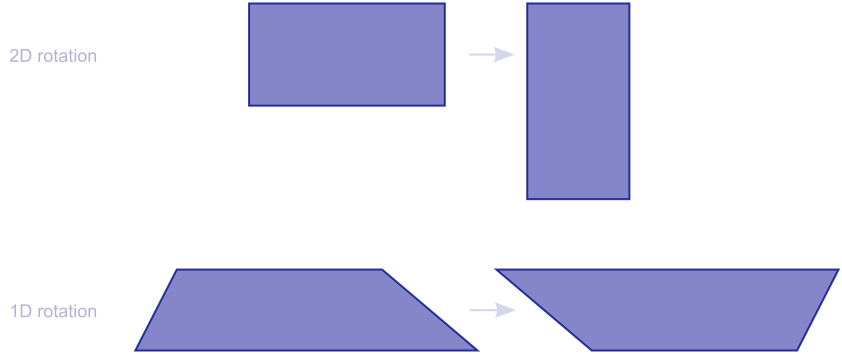
canMirrorbool def: falseSpecifies whether the pieces of this material group can be reversed (back to front) by 1D and true-shape algorithms.
Other algorithms ignore this property and determine allowed orientations only from the material, stock, and piece
structuresettings.
qualityLevel2D onlyQualityLevelenum Shape path simplification quality level
Allowed values
precissionHighest quality, but slowest.
compromiseGood quality and speed.
speedLowest quality, but fastest.
Specifies the quality level used for shape path simplification.
It influences the speed of the optimization process and the quality of the results.
Applies only to true-shape nesting algorithm.surpluslengthdef: 0This setting defines the default surplus for pieces, meaning the amount by which each cut element will be enlarged on all sides.
For instance, if a piece is 300x200 and the surplus is set to 2, the optimizer will use a size of 304x204.In the case of 1D materials, this applies, of course, only to the length.
surplusEditablebooldef: trueThis setting determines whether the surplus can be adjusted in the piece configuration.
If set tofalse, any surplus specified by the piece will be disregarded and the one defined in material group will be used.marginlengthdef: 0This setting determines the default margin for pieces, which is the amount by which each cut element will be reduced on all sides.
For instance, if a piece is 300x200 and the margin is set to 2, the optimizer will use 296x196.In the case of 1D materials, this applies, of course, only to the length.
marginEditablebooldef: trueThis setting determines whether the margin can be adjusted in the piece configuration.
If set to false, any margin specified by the piece will be disregarded and the one defined in material group will be used.defaultEdginglengthdef: 0Specifies default edging for new stock items.
cuttingDimensionsmandatory2D onlyDimensionsenum Piece size used for cutting
Allowed values
netThe size specified by length & width of the piece will be used.
Note that surplus and margin may be applied if they are specified.grossThe size of the piece will be increased by the thickness of the veneers used.
Specifies what should be the piece size that will be used for cutting.
canBeVeneeredbool 2D onlydef: falseSpecifies whether pieces of the material group can be veneered.
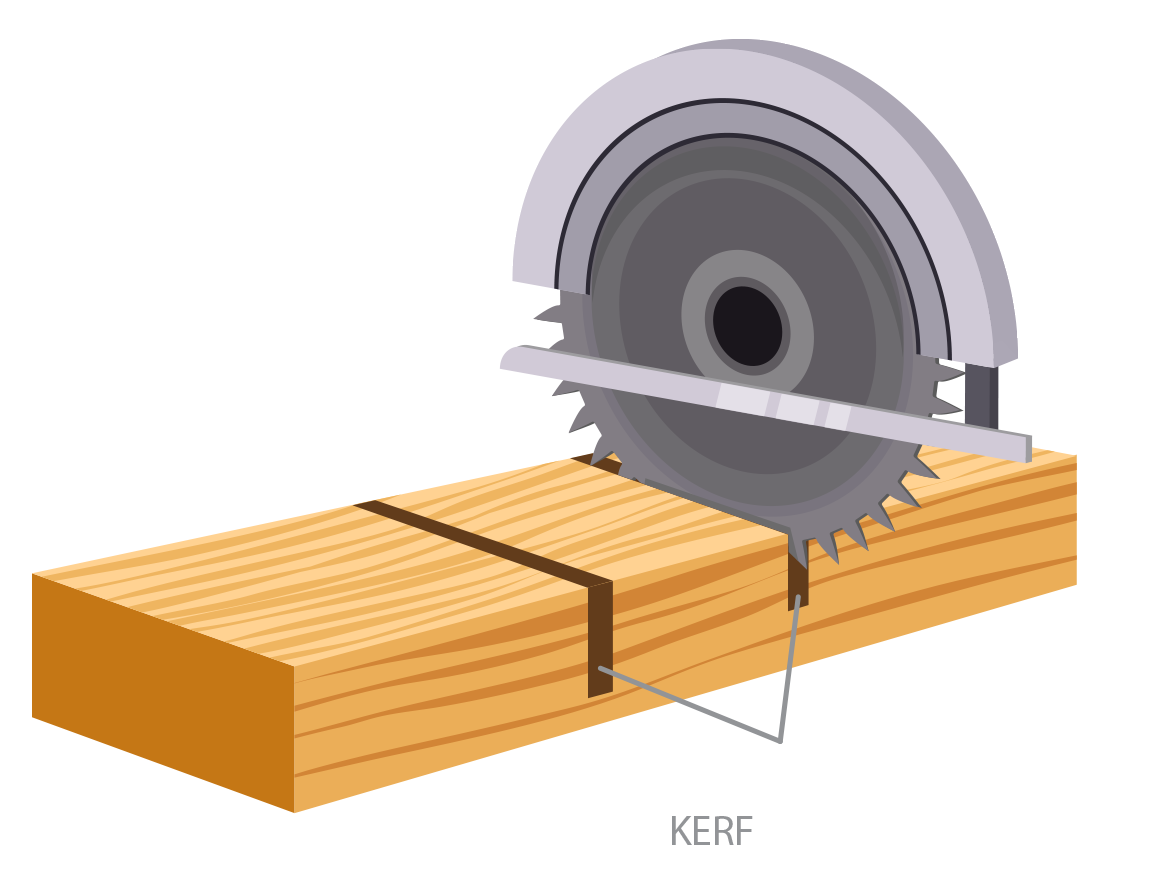
kerflength mandatorySpecifies the size of the kerf, i.e. the width of the waste line left by the cutting device.
minEdgeDistanceobjectOverrides the cutting device's minimum edge-to-cut distance for the supplied sides. An omitted side inherits the device value; an explicit
0disables the inherited limit for that side. A StockItem may override this setting again.Show Child Attributes
allowEdgeCutsbooldef: falseSpecifies whether it is possible to do something that we call the “edge cutting”.
If you have 2mm to cut off and the kerf is 3mm, then you kind of have to "take off" those 2mm with just the saw blade - that's edge cutting.
It cannot be enabled when the used cutting device's
minCutSizeorminCutDistanceis greater than zero. A positive value supplied through the legacyminCutWidthname has the same conflict because that name is an alias ofminCutSize.It requires a positive
kerf; otherwise the material is rejected withmaterial.allowEdgeCuts requires positive kerf.An algorithm that does not support it rejects a material with
allowEdgeCutsenabled, and any stock item of that material.With
allowEdgeCutsenabled, the kerf may overflow into a stock hole just as it may overflow beyond the stock edge, because a hole is no material. Without it, the kerf must stay in material, also next to a hole.cutShiftobject 2D onlyControls automatic shifting of adjacent material segments to prevent blade-overtravel damage when a perpendicular cut must extend beyond the target piece (e.g. stone cutting).
The optimizer may reserve ordinary waste between piece-bearing regions to provide clearance for blade overtravel. This can avoid an additional segment shift while preserving all configured cutting and machine limits.
Segment shifting is available only in algorithms with documented support. Select a compatible algorithm when this feature is required.
Show Child Attributes
Some algorithms additionally bound material and cuts within a configured machine envelope. While that envelope is active, only
totalShiftsLimitis enforced; the per-axis limits above are not applied separately.reuseWasteobjectIt defines the criterion for qualifying waste as usable.
Usable waste is one that goes to the warehouse for later use.A minimum length must not exceed the corresponding maximum when that maximum is set (not
0). Otherwise the material is rejected withreuseWaste: minimum shorter length exceeds maximum.orreuseWaste: minimum longer length exceeds maximum.Enabling reuse does not require every qualifying region to be retained. With optimal edging, an edge strip may remain ordinary waste when retaining it would prevent a valid cutting layout. Other suitable remnants can still be reusable. Cut-overrun safety and machine constraints continue to apply.
Show Child Attributes
stackCuttingobjectIt defines the stack cutting rules.
Stack cutting is available only with algorithms that support it. A material with stack cutting enabled is rejected by an algorithm that does not support it.Show Child Attributes
weightOfSqMweight 2D onlydef: 0Weight of a square meter of the material.
Weight values are used directly in cost calculations, including
utilizationCostPerKg. If the provided weight is inaccurate or left at default, disposal and waste-related cost optimization results will also be inaccurate.weightOfMeterweight 1D onlydef: 0Weight of a meter of the material.
Weight values are used directly in cost calculations, including
utilizationCostPerKg. If the provided weight is inaccurate or left at default, disposal and waste-related cost optimization results will also be inaccurate.costsobjectDefines cost parameters for cost-based optimization. See cmdAddJob's
bestSolutionCriterioninput parameter for more details.Available only with Enterprise license!Accurate cost values are essential for generating meaningful optimization results. Cost parameters may be defined on multiple levels -
Device,Material,Piece, andStockItem. If these values are incomplete, inconsistent, or significantly inaccurate, the optimization engine will inevitably reflect these issues in its output. To ensure reliable and realistic results, verify that all relevant cost fields are correctly provided and aligned with actual production and operational conditions.Show Child Attributes
standardStockItemslist(StandardStockItem)The list of standardStockItems for the material group.
algorithmDataobjectOptional opaque algorithm-specific data for this material. Its contents are implementation-defined and are not part of the public API contract.
Supply
algorithmDataonly through an integration-specific contract.Available only with Enterprise license! Without it the property is ignored.customDataanyCustom data that will be directly passed to
customData.materialproperty in Cutting.It can be any JSON compatible data, for example:
{ "myId": "932422" },"932422", or932422.Available only with Enterprise license!
Veneer
The Veneer object specifies characteristics of a veneer.
| Attributes |
|---|
idint mandatoryUnique id of the veneer.
titlestring mandatoryTitle of the veneer.
widthlength mandatoryWidth of the veneer.
thicknesslength mandatoryThickness of the veneer.
surpluslength def: 0The surplus is automatically added when the demand for the amount of veneer is calculated. Please note that the surplus is added twice.
maxMaterialThicknesslength mandatoryThe maximum thickness of the material for which this veneer can be used.
2D input
Piece
The Piece object describes piece.
| Attributes |
|---|
idint mandatoryUnique piece id.
materialIdint mandatoryThe ID of the material group from which this piece will be cut.
identifierstringThe user defined identifier of the piece. It must be Code128 barcode compatible.
colorstringColor of the piece.
descriptionstringDescription of the piece.
lengthlength mandatoryThe net length of the piece.
Keep in mind that for 1D shapes, it is always the total length, including slants: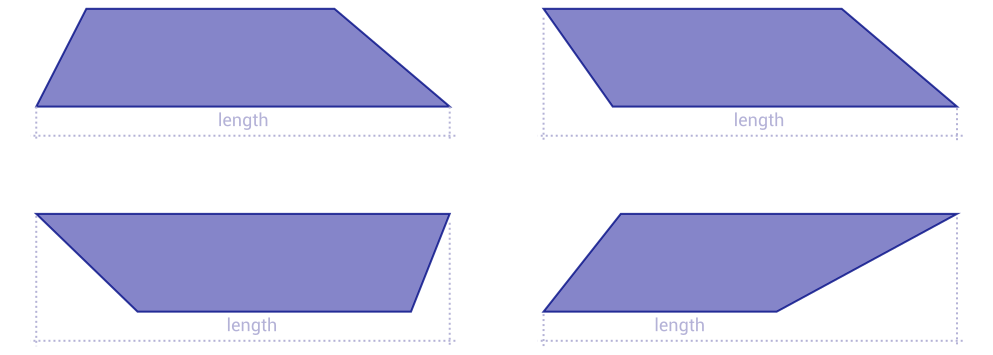
widthlength mandatory 2D onlyThe net width of the piece.
shapeTypedef: noneShapeTypeenum Shape of the piece
Allowed values
noneNo shape, the same as rectangle.
rectangleJust rectangle, so no additional shape definition is necessary.
linear1D shape with slants. The shape property contains slant values.
anyAny shape. You can define any shape using the shape property - convex or concave, or even with holes.
slantRectRectangle with one slanted corner.
LL-shaped piece.
rightTriangleRight triangle.
slopeRectRectangle with one sloped edge.
trapezoidTrapezoid shape.
octagonOctagonal shape.
ellipseElliptical shape.
circleCircular shape.
ringRing shape (circular with a hole).
Type of the shape of the piece.
shapeobjectDepending on
shapeTypeit may contain different format. See Shapes for more information.rotationStepangledef: 30°Specifies the rotation step. For instance, if it is set to 90, the piece can be rotated only by 0, 90, 180, or 270 degrees.
rotationangledef: 0°Specifies the initial rotation of the piece. It is useful when you want to have some pieces rotated by default.
mirrorbooldef: falseSpecifies whether the piece is mirrored (back to front).
quantityint mandatorySpecifies quantity of pieces.
structure2D onlydef: [none,byLength,byWidth]Structuresset Structure of the piece
Allowed values
noneThe material has no structure.
byLengthThe structure is horizontal (along length).
byWidthThe structure is vertical (along width).
Specifies acceptable structures of the piece.
Usually you want to specify only one value here, e.g.byLength.
But, sometimes you don’t care what structure a piece will have – then you can set it to “none,byLength,byWidth”.Structures are matched between the piece and the StockItem it is placed on.
A stock item without a structure accepts only pieces whose set containsnone, and such pieces may be placed in any orientation. In true-shape algorithms, free rotation on such stock additionally requirescanRotateof the Material.
A stock item with a structure accepts only pieces whose set containsbyLengthorbyWidth. A piece that accepts both may be placed in either orientation. A piece that accepts only one of them is placed in the single orientation that aligns it with the structure of the stock item, and it is never turned across that structure in order to fit.priorityint def: 1Priority of the piece. It can be any positive integer number. TonCut will use higher-priority pieces even if they cause larger waste.
The priority can also be expressed as a string, where:
normalcorresponds to priority1.highcorresponds to priority10.criticalcorresponds to priority100.automeans the priority is derived by the engine.
In cost-based optimization, priority guides piece placement and may contribute implementation-defined utility to the score used to compare solutions. This utility is not cash revenue. Under every other
bestSolutionCriterion, priority also affects that ranking: pieces are grouped by priority tier (normal,high,critical), and how completely each tier's demand is placed contributes to a solution's rank, so completing more high- or critical-priority pieces produces a better-ranked solution even at the cost of more waste.groupint def: 0Identifier of the destination rack (or pallet) for the piece. The optimizer is free to mix and interleave cuts from different groups in any sequence; only the
orderrule (see below) must be respected within each individual group. Group0is fully unrestricted: pieces assigned to it may be cut at any moment, in any order, and can break the internal ordering rules that apply to the other groups.The value must be within the WORD range (0...65535).Order groups are available only with algorithms that sequence them. A piece whose material uses an algorithm without that support is rejected if its
groupororderis not0. Set both to0(or omit them), or assign the material to an algorithm that sequences order groups.orderint def: 0In-group cutting priority. The value must be within the WORD range (
0...65535). For every non-zerogroup, pieces with a lowerordervalue must leave the cutting line before pieces with a higher value in the same group. If several pieces share the sameorder, their relative sequence is unconstrained as long as they all precede higher numbers and follow lower numbers in that group. This property is ignored for pieces in group0.The value must be within the WORD range (0...65535).Cross-group deadlock risk: Certain combinations of
ordervalues across different groups can create circular dependencies (e.g. group 1 needsorder=2cut before group 2’sorder=1, while group 2 simultaneously requires the reverse), preventing some pieces from ever being scheduled. Validate order sequences to ensure that no such deadlocks exist.costsobjectDefines cost parameters for cost-based optimization. See cmdAddJob's
bestSolutionCriterioninput parameter for more details.Available only with Enterprise license!Accurate cost values are essential for generating meaningful optimization results. Cost parameters may be defined on multiple levels -
Device,Material,Piece, andStockItem. If these values are incomplete, inconsistent, or significantly inaccurate, the optimization engine will inevitably reflect these issues in its output. To ensure reliable and realistic results, verify that all relevant cost fields are correctly provided and aligned with actual production and operational conditions.Show Child Attributes
surpluslengthdef: 0Specifies the surplus, meaning the amount by which the piece size will be enlarged on all sides.
For instance, if a piece is 300x200 and the surplus is set to 2, the optimizer will use a size of 304x204.In the case of 1D materials, this applies, of course, only to the length.
marginlengthdef: 0Specifies the margin, which is the amount by which the piece size will be reduced on all sides.
For instance, if a piece is 300x200 and the margin is set to 2, the optimizer will use 296x196.In the case of 1D materials, this applies, of course, only to the length.
veneersobject 2D onlySpecifies which veneers should be used.
This parameter is only used if the
shapeTypeis specified asnoneorrectangleand the material group allows veneering (i.e. itscanBeVeneeredproperty is set totrue).If
shapeTypeis set torectangle, the veneers specified here will override the veneers in shape definition!Show Child Attributes
weightfloatOptional relative importance of the piece when the optimizer weighs the area it places. It is a dimensionless factor, not a mass. It must be a finite number that is not negative; a negative value is rejected. An explicit
0behaves as if the property were omitted. When omitted, the engine derives it from the piece's area.weightis not the same aspriority. How it influences the result is implementation-defined.weightModifierfloatdef: 1Multiplier applied to the piece's weight. It must be a finite number that is not negative; a negative value is rejected.
0means that the piece does not contribute to the weighted area.previewColorstringdef: noneColor used when this piece is drawn in a preview. One of:
"#rrggbb"- a hexadecimal RGB color, for example"#ff8800"; exactly six hexadecimal digits after#, letters in either case."none"- no preview color is assigned (the default)."random"- a stable color derived from the pieceidis used.
The keywords
noneandrandomare matched case-insensitively. The value does not influence optimization in any way.The value must be a JSON string. A JSON number is rejected, like any other string that is not a valid color, with
previewColor: expected color in #rrggbb form, "none", or "random".; a boolean, object, array or null is rejected withpreviewColor: expected a color string.algorithmDataobjectOptional opaque algorithm-specific data for this piece. Its contents are implementation-defined and are not part of the public API contract.
Supply
algorithmDataonly through an integration-specific contract.Available only with Enterprise license! Without it the property is ignored.customDataanyCustom data that will be directly passed to
customDataproperty in ResultPiece.It can be any JSON compatible data, for example:
{ "myId": "932422" },"932422", or932422.Available only with Enterprise license!
StockItem
The StockItem object describes a StockItem.
| Attributes |
|---|
idint mandatoryUnique StockItem id.
materialIdint mandatoryThe ID of the material group the StockItem is made from.
identifierstringThe user defined identifier of the StockItem.
It must be Code128 barcode compatible.descriptionstringDescription of the StockItem.
priorityint def: 10Priority of the StockItem, an integer from
0to100. Higher values mean the StockItem is consumed earlier.The priority can also be expressed as a string, where:
lowcorresponds to priority0.normalcorresponds to priority10(the default).
Unlike piece priority,
highandcriticalare not valid StockItem priority labels; use a numeric value above10instead.A numeric value outside
[0, 100]is rejected withstock N: priority must be within [0, 100].(Nis the StockItemid); a string that is not one of the named labels (for example"high") is rejected withpriority: unknown enum value "high".; a value that is neither a number nor a string is rejected withstock.priority must be an integer or named priority.Priority is soft: it never forces a stock order by itself. Stock is ordered by the selected stock-order strategy's own criteria, and priority breaks only an exact tie between stock items that are otherwise equal under that strategy. Independently of ordering, the solution score also receives a bonus or penalty relative to
normalpriority, bounded so it can only decide between otherwise-close layouts - in price-less input, where there is no financial score to adjust, it therefore only breaks ties. Leaving every StockItem's priority at the default10does not change optimization results.If every StockItem in an input shares the same non-default priority (for example, every StockItem is
low, which is common in real inputs), the score adjustment still applies to every sheet: no StockItem is preferred over another, but the adjustment itself shifts every sheet's score by the same bounded amount, so the finished result can still differ from an older engine version or from an equivalent input that instead leaves every StockItem at the default priority. To reproduce the previous, unadjusted behaviour, leave priority at its default (10, normal) for every StockItem.This replaces the previous
low/normalStockItem priority, and two behaviours changed as a result.low-priority stock is no longer strictly tried after allnormal-priority stock - it is used whenever doing so otherwise produces a better-scoring layout. And alow-priority sheet with a negative score (material cost without piece income) is no longer preferred overnormal-priority stock; older engine versions could prefer it in that case.lengthlength mandatoryLength of the StockItem.
widthlength mandatory 2D onlyWidth of the StockItem.
quantityint mandatoryIf stack cutting is enabled for the Material, it specifies the quantity of stacks. Otherwise, it indicates the quantity of stock items.
The meaning of the
quantityproperty varies depending on whether stack cutting is enabled or disabled.stackSizeintThe stack size. Note that stack cutting applies only to stock items with standard dimensions.
Applies only to material groups with enabled stack cutting. See the
stackCuttingproperty of the Material data object.structure2D onlydef: noneStructureenum Structure of the StockItem
Allowed values
noneThe material has no structure.
byLengthThe structure is horizontal (along the length).
byWidthThe structure is vertical (along the width).
Specifies the structure of the StockItem.
edgingobjectEdging configuration.
Show Child Attributes
minEdgeDistanceobjectOverrides the material or device minimum edge-to-cut distance for the supplied sides. An omitted side inherits the material or device value; an explicit
0disables the inherited limit for that side.minEdgeDistancecontrols where a cut may be placed, whileedgingreserves an unusable material band. Do not set both to a positive value on the same side.Show Child Attributes
cutShiftobject 2D onlyControls automatic shifting of adjacent material segments to prevent blade-overtravel damage when a perpendicular cut must extend beyond the target piece (e.g. stone cutting).
Segment shifting is available only in algorithms with documented support. Select a compatible algorithm when this feature is required.
Show Child Attributes
A negative value (including the default
-1) or an omitted field inherits the Material's effective limit for that axis; the material's own0-or-absent-means-no-shift and negative-means-unlimited convention then applies. A value of0allows no shifts on that axis, even if the material allows them. While a configured machine envelope is active for the selected algorithm, only the material'stotalShiftsLimitis enforced and these per-axis limits do not apply separately.defectslist(Defect)Defines the list of defects: damaged parts of the stock, such as a scratch. A defect is still material. It counts toward the stock's material area, it can be cut through, and it can end up in waste or in reusable waste. The optimizer only avoids placing a piece on it.
Defect support depends on the selected cutting method. For automatic rectangular cutting, method selection takes each stock item's defects into account. An explicitly selected method must support the supplied defects. An automatic cutting method that does not support defects rejects stock with a non-emptydefectslist at load instead of ignoring it.holeslist(Hole)Defines rectangular voids where the stock contains no material. The stock already comes with them; the engine never creates holes. Unlike defects, a hole is not material: there is nothing to cut, it is not waste, and it is neither usable nor available area. The stock's material area excludes its holes.
Holes are supported by a limited set of cutting methods (for example, to describe stepped or stair-shaped stock), so an explicitly selected method must support them.
Nothing is cut in a hole. Cuts end at a hole edge, the cut length and cutting cost count only the parts of a cut that pass through material, and a hole edge is not a cut. The kerf may overflow into a hole only when the material's
allowEdgeCutsis enabled.costsobjectDefines cost parameters for cost-based optimization. See cmdAddJob's
bestSolutionCriterioninput parameter for more details.Available only with Enterprise license!Accurate cost values are essential for generating meaningful optimization results. Cost parameters may be defined on multiple levels -
Device,Material,Piece, andStockItem. If these values are incomplete, inconsistent, or significantly inaccurate, the optimization engine will inevitably reflect these issues in its output. To ensure reliable and realistic results, verify that all relevant cost fields are correctly provided and aligned with actual production and operational conditions.Show Child Attributes
algorithmDataobjectOptional opaque algorithm-specific data for this stock item. Its contents are implementation-defined and are not part of the public API contract.
Supply
algorithmDataonly through an integration-specific contract.Available only with Enterprise license! Without it the property is ignored.customDataanyCustom data that will be directly passed to
customData.stockproperty in Cutting.It can be any JSON compatible data, for example:
{ "myId": "932422" },"932422", or932422.Available only with Enterprise license!
Defect
This object describes location of stock item's defect, a damaged part of the material. A defect is still material, unlike a Hole.
| Attributes |
|---|
Defect and hole rectangles of a StockItem are checked when it is loaded:
x and y must not be negative, length and width must be greater than zero,
and the rectangle must lie inside the stock item.
xlengthX-coordinate of the defect’s upper-left corner, measured from the stock origin (0 mm, 0 mm) along the primary length (X) axis.
ylengthY-coordinate of the defect’s upper-left corner, measured from the stock origin along the width (Y) axis.
lengthlength mandatoryHorizontal extent of the defect parallel to the X axis. It must be positive.
widthlength mandatoryVertical extent of the defect parallel to the Y axis. It must be positive.
Hole
A Hole object describes a rectangular area where material is absent. It is used
for holes in a StockItem and for holes
in a Waste item.
A hole is not a defect: it is no material at all, so it is not waste and not usable area.
The stock comes with its holes; the engine never creates them.
Nothing is cut in a hole: cuts end at a hole edge, cut length and cost count only material, and a hole edge is not a cut.
minEdgeDistance applies at a hole edge as at a sheet edge, using the margin of the side the hole edge stands in for: a hole edge with material below it acts as a top edge, one with material to its right as a left edge.
With allowEdgeCuts enabled the kerf may overflow into a hole as it may beyond the stock edge; without it the kerf stays in material.
| Attributes |
|---|
xlengthX-coordinate of the hole's upper-left corner, relative to the containing stock or waste item.
ylengthY-coordinate of the hole's upper-left corner, relative to the containing stock or waste item.
lengthlength mandatoryHorizontal extent of the hole parallel to the X axis. It must be positive.
widthlength mandatoryVertical extent of the hole parallel to the Y axis. It must be positive.
Hole object
ResultPiece
This object describes location and transformation of a piece that was placed on a cutting.
Normally you don't have to know how the shapes are transformed,
as we are providing the shape property, which is already transformed.
But, just in case it is needed for whatever reason, here is how the transformation works.
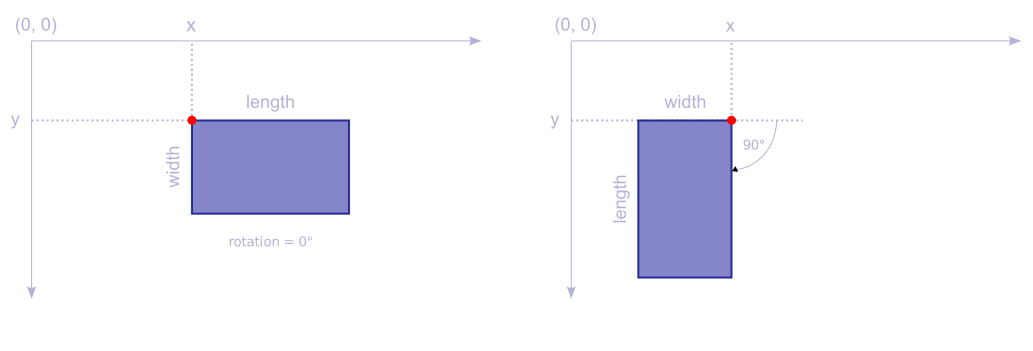
Here is how 2D piece is positioned depending on its rotation:
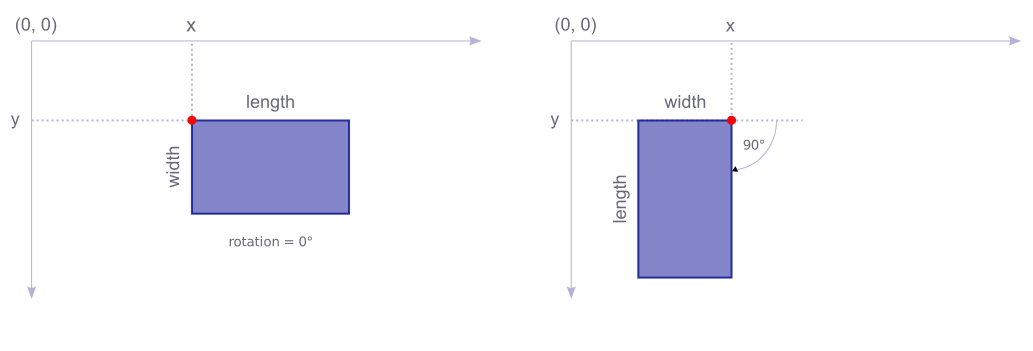
Linear pieces are positioned in a different way.
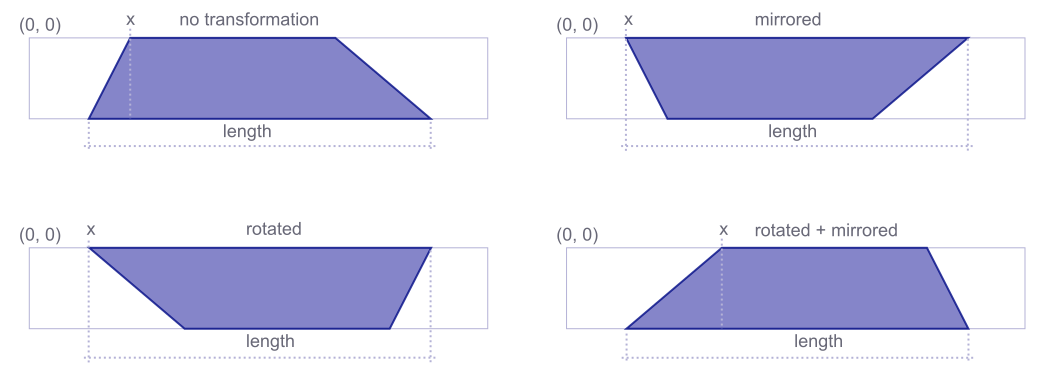
The order of transormation is:
- Rotation - rotation is done around the origin point
[0, 0]of the shape. - Mirror - a flip around the
Yaxis. - theYcoordinates are simply multiplied by-1. - Translation - the shape is moved to its target position, so its
[0, 0]is placed on[x, y]position.
| Attributes |
|---|
pieceIdintID of the piece.
xlengthX position of the piece.
ylengthY position of the piece.
rotationangleSpecifies the rotation angle of the piece.
Note that in previous versions of the JSON format (older than
3), we hadrotatedboolean property instead. The way the pieces are transformed is different for 1D and 2D materials.For 1D materials, it is easy. The piece may be rotated by 0° or 180°. If it is rotated, the
rotationproperty will be180°, otherwise it will be0°. It works like before.
But, for 2D materials, it is different now. The rotation is always done around the origin point of the piece.
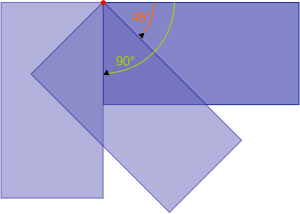
See also the transformation order above.
mirroredboolSpecifies if the piece was reversed (back to front). It is present for 1D pieces only, always, with the value
trueorfalse; a 2D piece does not carry it.See also the transformation order above.
shapestringThe shape of the piece after rotation and mirror transformations were applied. See Shapes for more information.
The shape is in SVG path format.
bboxobjectThe bounding box of the piece including all modificators: net/gross dimensions, surplus and margin.
Show Child Attributes
customDataanyCustom data passed directly from
customDataproperty in Piece.Available only with Enterprise license!
Waste
The Waste object describes a waste item.
| Attributes |
|---|
xlengthX position of the waste.
ylengthY position of the waste.
lengthlengthLength of the waste.
widthlengthWidth of the waste.
holeslist(Hole)Optional rectangular voids within the waste item's bounding rectangle. These are holes carried over from the stock; they hold no material, so they are not waste. Hole coordinates are relative to the waste item's
xandyposition. The waste area excludes these holes. Present only whenusableistrue.defectslist(Defect)Optional defects associated with this waste item. A defect is damaged material that remained inside the waste item, so it is part of its area. Present only when
usableistrue.identifierstringAutomatically generated identifier string.
usableboolSpecifies whether the waste is usable.
shapeTypeShapeTypeenum Shape of the waste
Allowed values
noneNo shape, the same as rectangle.
rectangleJust rectangle, so no additional shape definition is necessary.
linear1D shape with slants. The shape CustomProperty contains slant values.
Optional type of the shape of the waste.
shapeobjectOptional shape details whose format depends on
shapeType.For the moment only LinearShape is supported.
Cut
Cut object describes a cut to be made.
| Attributes |
|---|
typeCutTypeenum Type of the cut
Allowed values
lineA straight cut segment between two points.
curveA cubic bezier curve cut between two points with two control points.
Type of the cut.
startXlengthStart X position of the cut.
startYlengthStart Y position of the cut.
endXlengthEnd X position of the cut.
endYlengthEnd Y position of the cut.
startXplengthFirst control point's X position for cubic bezier curve.
startYplengthFirst control point's Y position for cubic bezier curve.
endXplengthSecond control point's X position for cubic bezier curve.
endYplengthSecond control point's Y position for cubic bezier curve.
needShiftboolMarks this cut as the governing boundary for one segment motion. At the start of this event, after earlier governing motions, the cut line is evaluated against the blade-reach limits before this event's own motion. The affected material is then displaced at this boundary before overrun safety and the post-event material state are evaluated. May be set to
trueonly when the Material optioncutShift.cutExcessis greater than0.Segment shifting is available only in algorithms with documented support. Select a compatible algorithm when this feature is required.
shiftDistancelengthComplete movement commanded at this cut's governing boundary, including any case-2 contributions folded into this event. The value is
0whenneedShiftisfalse.Segment shifting is available only in algorithms with documented support. Select a compatible algorithm when this feature is required.
Cutting
The Cutting object describes single cutting.
| Attributes |
|---|
stockItemIdint mandatoryID of the StockItem for which this cut is made.
quantityint mandatoryIf stack cutting is enabled for the material, it indicates the number of stacks the cutting should be performed for. Otherwise, it indicates the number of times the cutting should be performed.
The meaning of the
quantityproperty varies depending on whether stack cutting is enabled or disabled.stackSizeintOptional. If stack cutting is enabled for the material, it indicates the size of a single stack.
statisticsobject mandatoryStatistics of the entire cutting.
Show Child Attributes
pieceslist(ResultPiece) mandatoryA list of all pieces placed on the cutting, including their positions and transformations.
restlist(Waste) mandatoryA list of all Waste items, including their positions and sizes.
cutslist(Cut) mandatoryA list of Cut objects.
costpriceTotal estimated production cost for this cutting, calculated from the Device, Material and StockItem
costsparameters (machine time, tool wear, material price, etc.).Available only with Enterprise license!incomepriceTotal selling income for the pieces placed in this cutting, before subtracting
cost.Available only with Enterprise license!gainpriceTotal profit for this cutting, defined as
incomeminuscost. When cost-based optimisation is enabled, solutions are ranked by the highest positivegain.Available only with Enterprise license!scorepriceFinal optimization score for this cutting, written like
cost,incomeandgain. The score is intended for comparing results; its calculation is implementation-defined.Available only with Enterprise license!customDataobjectOpaque application-defined data propagated from the input. The engine does not interpret its contents. The whole object is omitted when all three entries below are empty.
Available only with Enterprise license!Show Child Attributes